Introduction Before putting drew house T-shirts into a consolidated package, what you really need to confirm is not the unit price on the product page, but how much cost can be accounted for from product selection to final receipt, and which numbers may still change. This article handles one specific task: after viewing drew house T-shirts on fashionreps, record product and order-related fields, then use the target shopping agent's current fee tool to verify the true total cost before consolidat
Introduction
Before putting drew house T-shirts into a consolidated package, what you really need to confirm is not the unit price on the product page, but how much cost can be accounted for from product selection to final receipt, and which numbers may still change. This article handles one specific task: after viewing drew house T-shirts on fashionreps, record product and order-related fields, then use the target shopping agent's current fee tool to verify the true total cost before consolidation.
This verification does not apply to orders that have already been submitted for payment, warehouse weighing completed, or line quotes expired. Product page prices, agent service fees, payment processing fees, exchange rates, packaging methods, and international shipping costs must be recorded separately; you cannot treat the page reference price as the final landed cost. 🧾
Clarify the cost decision before consolidating drew house T-shirts
First determine the decision at hand: continue to purchase and consolidate, or hold off until product information, warehouse weight, or line quotes become clearer.
Before consolidation, you must answer at least four questions:
- What specific style, color, and size have you selected?
- What is the current price and any discount conditions shown on the product page?
- What service, payment, or packaging fees will the agent platform charge?
- What is the current shipping cost for the destination country, package weight, dimensions, and shipping line?
If any of these can only be estimated, mark it as "unverified" rather than writing a seemingly precise total. ⚠️
Record style, color, size, and current visible price from the fashionreps product page
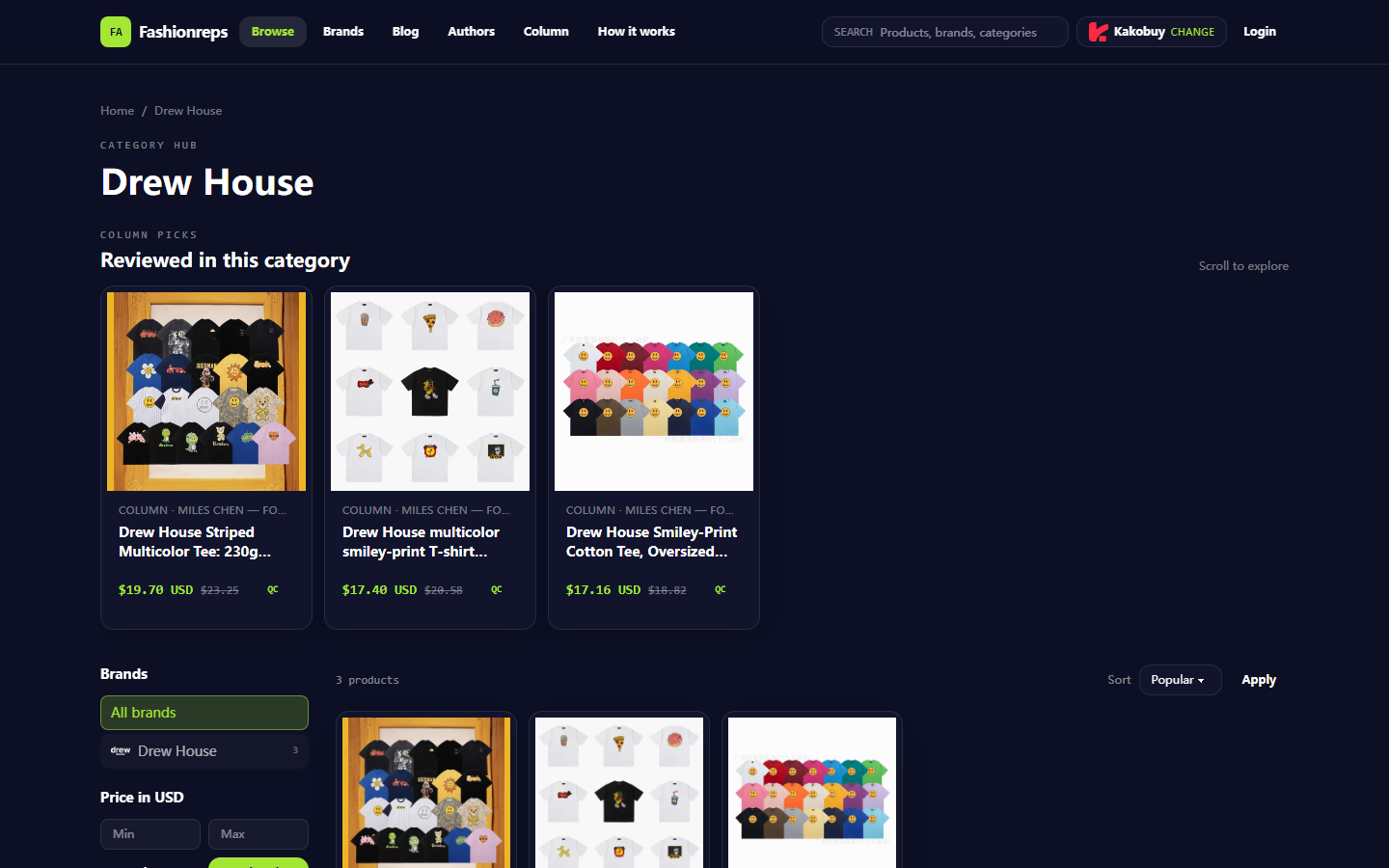
The Drew House category page on fashionreps currently shows 3 related products, and the page provides reference prices, not final order amounts. The prices visible in the screenshot are recorded as follows:
| Product record | Current reference price on page | Previous reference price shown | Notes |
|---|---|---|---|
| Striped Multicolor Tee, 230g cotton, loose fit, about 50 colorways | 19.70 USD | 23.25 USD | Need to further confirm specific color, size, and external product page status |
| Multicolor smiley-print T-shirt collection, combed cotton, S–XL | 17.40 USD | 20.58 USD | Need to confirm if selected style still has corresponding size and color |
| Smiley-Print Cotton Tee, loose fit, 20 colorways | 17.16 USD | 18.82 USD | Need to confirm specific product variant and current availability |
The visible information on the page can only support preliminary recording of style, material description, size range, number of colorways, and reference price. It alone cannot prove inventory, final transaction price, actual weight, product quality, or after-sales outcome.
When actually recording, copy the product page name into the order sheet, and additionally fill in:
- Time of access to the product page or product detail page;
- Specific color, size, and quantity;
- Whether the page shows discounts, limited-time prices, or other purchase conditions;
- Selected shopping agent;
- Whether the product link opens normally, or shows redirects, blank pages, or missing variant information.
The fashionreps page will direct the Buy button to the user's selected external shopping agent. Order, payment, and shipping are handled by the agent platform, so the product reference price may differ from the amount ultimately shown on the agent platform. 📌

Figure: Record of products and reference prices visible on fashionreps Drew House category page.
Verify product cost, service fees, payment processing fees, and exchange rate source
Total cost accounting should separate numbers from different sources. The product page provides product selection and reference price; the agent platform displays order amount, service fees, warehousing or packaging-related fees; the payment step may show additional processing fees; and the exchange rate needs a source and query time.
Use the following sequence for verification:
- Record the USD reference price shown on the fashionreps product page.
- Open the selected agent's product or cart page to confirm the product amount shown on the agent side.
- Check for any service fees, purchasing fees, payment processing fees, or other order-level fees.
- Confirm the settlement currency and actual charge amount used by the agent.
- Record the exchange rate source, query time, and conversion direction.
- Save the platform quote separately from your own conversion result to avoid mistaking an estimated exchange rate for the final charge rate.
You can use the following calculation framework:
Product subtotal = unit product amount × quantity
Order stage subtotal = product subtotal + service fee + payment processing fee + other clearly displayed fees
Estimated total cost before consolidation = order stage subtotal + known packaging fees + currently available international shipping quote
If the agent page does not show a certain fee, fill in "not shown", not zero. Zero means you have confirmed there is no fee, while "not shown" means it still needs to be verified at the order or warehouse stage.
In particular, distinguish between "reference price", "cart amount", "payment confirmation amount", and "final charged amount". These numbers correspond to different stages and cannot be mixed. 💱
Compare fields to record when keeping original packaging, adjusting packaging, and consolidating
Packaging choices affect weight, volume, damage risk, and subsequent shipping options. Without actual warehouse data, you can only compare recording methods; you cannot assert in advance that one option is definitely cheaper.
Keeping original packaging is suitable when you want to reduce unpacking operations, preserve product packaging, or are temporarily unsure of product condition, but it may increase volumetric weight and make the package larger.
Adjusting packaging is suitable when you have confirmed that outer packaging need not be kept, and the agent platform can clearly show the adjusted weight or dimensions. It may reduce volume but may also incur additional handling fees; the actual result must be based on agent page or warehouse records.
Consolidation is suitable when multiple orders have been received at the warehouse and you want to compare shipping lines and fixed costs together. Consolidation may reduce duplicate first weight or some handling costs, but may also increase package value, volumetric weight, and single-loss risk. If different products have return/exchange, brand restrictions, line restrictions, or packaging requirements, consolidation may not be suitable.
For each option, you should record at least:
- Products and quantities received at warehouse;
- Actual weight of individual and consolidated packages;
- Length, width, height dimensions;
- Whether original packaging is kept;
- Whether repackaging or consolidation service fees are incurred;
- Available shipping lines and their restrictions;
- Declaration information and potential taxes in destination country;
- Insurance, compensation, or after-sales conditions;
- Query time and screenshot or order record location.
To compare savings, use the same currency, same query time, and same line conditions. You cannot directly subtract the old reference price on the product page from the new warehouse-stage quote and call the difference "already saved".
Use the target site's current fee tool to verify weight, dimensions, line, and shipping cost
International shipping costs usually become closer to the real quote after the agent's warehouse completes weighing and measurement. During verification, enter or confirm in the target shopping agent's current fee tool:
- Destination country or region;
- Actual package weight;
- Length, width, height;
- Product category or declaration type;
- Whether consolidated;
- Whether additional packaging services are needed;
- Target shipping line;
- Currency and quote validity time.
The quote returned by the tool should be recorded as "real-time quote at query time", and note whether it includes fuel surcharges, remote area fees, taxes, insurance, or other additional items. If the page does not clearly state the scope of inclusion, you cannot write the quote as the final landed cost.
Destination country taxes and import restrictions must not be handled through under-declaration, splitting orders to avoid tax, or evading inspection. Prepare declaration information based on true product, true value, and destination country regulations, and save potential taxes as unverified items or separate estimates.
Use a cost table to distinguish page facts, real-time quotes, and unverified items
It is recommended to use a cost table, labeling each number with its source and status. This prevents mixing data from different stages into a single total.
| Cost item | Current recording method | Status judgment |
|---|---|---|
| Product reference price | Copy visible amount and product name from fashionreps page | Page fact, still need to confirm agent-side amount |
| Specific variant | Record color, size, quantity | Must confirm before purchase |
| Service fee and payment processing fee | Based on actual display on agent settlement page | Mark unverified if not shown |
| Exchange rate | Save source, currency, query time | May change with payment time |
| Packaging and consolidation fee | Based on agent warehouse or order page | Await operation or warehouse stage confirmation |
| International shipping | Based on current weight, dimensions, destination, and line tool | Real-time quote, may expire |
| Taxes and import-related fees | Verify according to destination country rules and actual declaration conditions | Should not be treated as zero arbitrarily |
The final decision can be divided into three types:
- Continue: Key fields have been confirmed, estimated cost is within acceptable range, and line and compliance conditions are clear.
- Hold: Product can be purchased, but weight, line, packaging, or fees still lack important data.
- Abandon or change selection: Specific variant out of stock, page information incomplete, line not applicable, or estimated cost exceeds budget.
Only after all key fields have been verified is it appropriate to compare different consolidation options. 🔍
Which condition changes will invalidate the original calculation
The following changes can invalidate the previous total cost:
- Changes in product reference price, discounts, or available variants;
- Changes in service fees or payment methods displayed by the shopping agent;
- Exchange rate changes between order and payment;
- Actual warehouse weight higher than estimated;
- Packaging adjustments causing changes in dimensions or volumetric weight;
- Planned line suspended, restricted, or billing rules changed;
- Changes in destination country taxes, declaration requirements, or import restrictions;
- After consolidation, package value, dimensions, or compensation conditions no longer applicable.
Therefore, old tables can only serve as historical records and cannot automatically be treated as current quotes. Before paying again or submitting a package, re-save the time, amount, weight, dimensions, line, and page evidence.
Final action: Save query time and evidence before deciding to consolidate or hold
After verification, put the product page, agent cart or settlement page, warehouse weight and dimensions, packaging plan, and shipping quote in the same record, and note the query time for each data item. Do not save only a total price, because a total price cannot show which parts are confirmed and which parts may still change.
If consolidation indeed reduces duplicate first weight or fixed handling costs, write the difference between the original plan and the consolidation plan in the table, and also record the increased risks, such as higher package value, volumetric weight, single-loss risk, or line restrictions. Consolidation is typically suitable for orders that have been received, weight and dimensions are clear, products have no separate shipping requirements, and the user can accept concentrated risk.
Cases not recommended for consolidation include: products not yet fully verified, different orders with independent return/exchange needs, lines with restrictions on product categories, packaging sizes that may trigger higher billing, or inability to accept a single package loss after consolidation. If key fees remain unverified, holding is often safer than submitting directly based on page reference prices.
Finally, check again: product reference price is not the landed cost, and consolidation is not automatic savings. Only when the savings amount, increased risks, applicable people, and non-applicable conditions can be supported by the same record can you make a consolidation decision.
Shopping Agent Platform FAQ
1. What categories of products are available on repgalaxy.tips?
repgalaxy.tips offers a very complete range of products, including shoes, T-shirts, sweaters, hoodies, jeans, sweatpants, shorts, beach shorts, factory clearance items, down jackets, baseball shirts, shirts, hats, jewelry, bags, electronics, sunglasses, socks, underwear, and trendy collectibles.
2. What should new users of repgalaxy.tips pay attention to when using the spreadsheet for the first time?
New Taobao agent users accessing repgalaxy.tips through the spreadsheet for the first time generally receive a new user shipping discount package. At the same time, you should refer to the step-by-step shopping tutorial for beginners.
3. How do I view quality inspection photos on repgalaxy.tips?
When checking quality inspection photos, you should focus on the specific features of the purchased product. For example, for shoes, you need to check several key parts, such as the toe, heel, and tongue, looking at stitching, shoe shape, and tongue thickness to determine if they are high-quality shoes. For clothing, check details such as collar labels, logo embroidery, fabric, and the flatness of the neckline and cuffs.
4. Why doesn't repgalaxy.tips use Google Sheets?
Google Sheets is only suitable for spreadsheets with a small number of products. Once the number of products increases, loading becomes very slow and the system noticeably lags. Especially on mobile devices, the visual experience is poor and searching for products is inconvenient. For the same products, repgalaxy.tips' spreadsheet loads faster and offers a better visual experience.