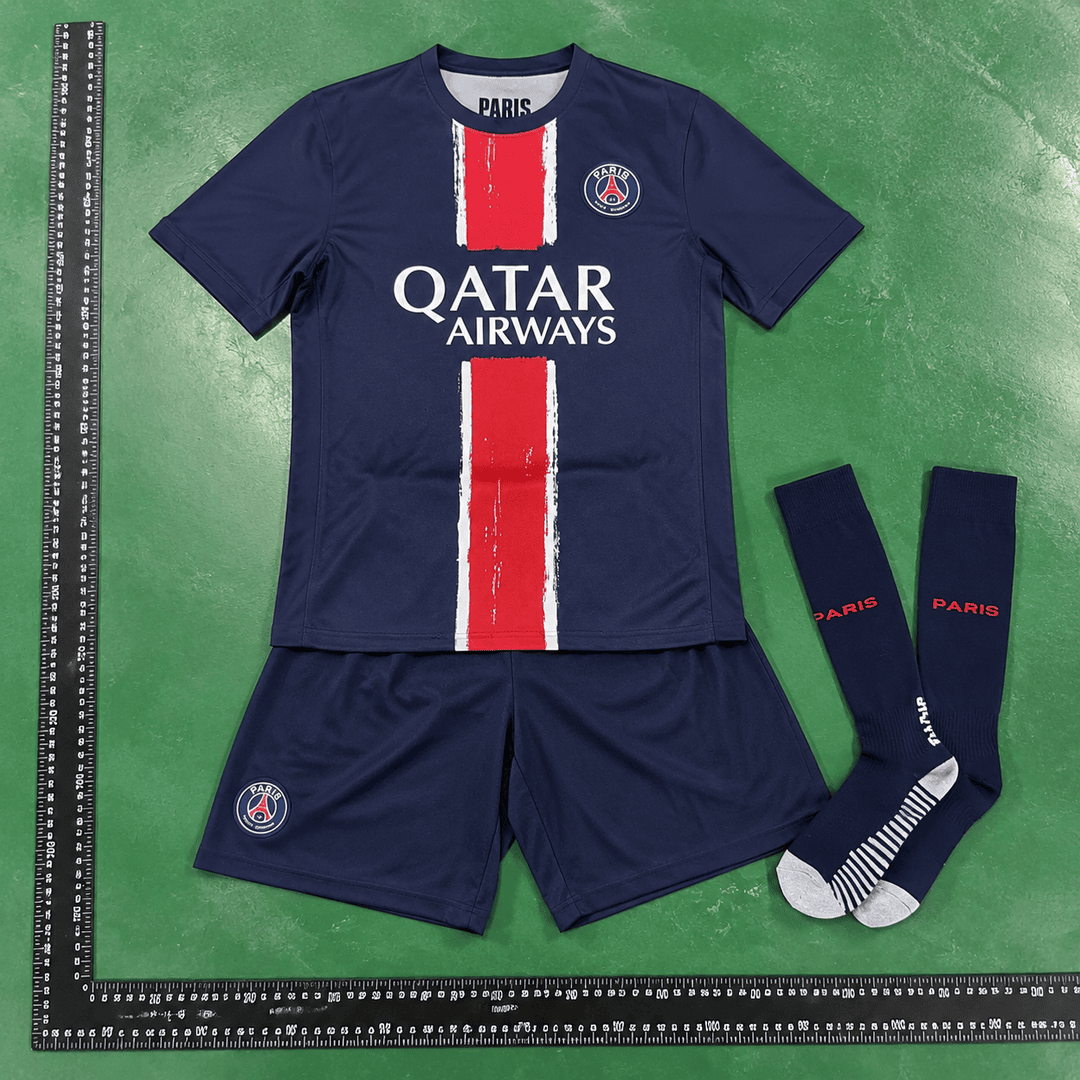
Before placing an order, the key is not just checking if the jersey color looks right, but confirming that the number, name, patch, and size you selected all match each other in the QC photos for the same item. This article reviews a Paris Saint-Germain jersey set on the fashionreps product page. Current page evidence shows the item involves a dark blue jersey, number options, and size information, but the available materials are in
Before placing an order, the key is not just checking if the jersey color looks right, but confirming that the number, name, patch, and size you selected all match each other in the QC photos for the same item. This article reviews a Paris Saint-Germain jersey set on the fashionreps product page. Current page evidence shows the item involves a dark blue jersey, number options, and size information, but the available materials are insufficient to make quality or authenticity judgments on all details.

Image: Layout diagram for Paris Saint-Germain jersey QC verification information, not physical evidence, and does not represent hands-on testing results.
First Confirm Which Item the Photos Correspond To
Start by going to the Paris Saint-Germain jersey product detail page on fashionreps, then click "View QC Photos" to see the QC photos for that item. Do not use images from search results, brand pages, category pages, or other products as the basis for checking your current order.
Current product information describes the item as a Paris Saint-Germain blue kids' soccer jersey, with sizes marked 14–30. The verified page source text also shows that the page includes two styles and has a record of a dark blue Paris Saint-Germain jersey with number 99. Since this information does not fully show the correspondence between each selectable variant and the images, you cannot infer that your selected number, name, patch, or actual size label definitely matches.
When entering the QC photo gallery after ordering, first record the following:
- The color or style selected in the order.
- The number and name printing selected in the order; if there is no name option, also confirm that the page was not accidentally selected for another printing variant.
- The size selected in the order.
- Whether the QC photos clearly belong to this item and not another style on the same page.
- Whether the photos are clear enough to see the front, back, cuffs, collar, and size label.
Verify Against Four Groups of Evidence
| Verification Item | Visible Evidence to Look For in the Photos | What to Do If Cannot Confirm |
|---|---|---|
| Number and Name Printing | Whether the back printing content, position, letters, or numbers match the order variant; whether there is obvious skewing, missing characters, or misalignment | Request a close-up of the back and contact the agent to verify the variant record |
| Patch or Badge | Whether the patch is visible on the sleeve, and the position, edges, and design are clear | If the photo is too far or obstructed, do not make your own judgment; request a close-up of the sleeve first |
| Size Label | Whether the size on the collar or side label is readable and matches the size selected in the order | If the label is blurry, missing, or does not match the order, pause confirmation |
| Color and Style | Whether the overall color, stripes, or print layout matches the selected style | If there is obvious color cast due to lighting or the style cannot be distinguished, request a retake in natural light or clearer photos |
The requirements in the table are photo verification methods, not a guarantee that the item has reached a certain quality standard.
How to Judge Number and Name Printing
Check the order variant first, then the QC photos. Do not assume the number is correct just because a number appears on the back of the jersey. Verify item by item: the number content, name letters, printing position, and whether the printing belongs to the currently selected style.
If the photo only shows the front of the jersey, or the back is too far away, the editor can only judge it as "insufficient evidence" and cannot confirm the printing is correct. If the order selected number 99, request a photo that clearly shows the full back; if a name was selected, also confirm that every letter of the name is readable. The page data showing a record of number 99 does not mean your order has selected 99, nor that the jersey in the QC photos is that variant.
In the following situations, pause confirmation:
- The number or name in the QC photos does not match the order record.
- The number is visible, but the name printing cannot be read, and the order includes a name option.
- There is no photo of the back, so misprinting or omission cannot be ruled out.
- The jersey style in the photos does not match the color or style selected in the order.
Patches Cannot Be Replaced by Main Images
The patch is a detail requiring local evidence. Check the sleeve in the QC photos of the corresponding item to confirm whether a patch exists, which side it is on, and whether the edges are obviously lifting, peeling, or severely misaligned.
If there is only a main product image or a distant full-body shot, you cannot treat the patch appearance in the main image as physical QC evidence. If the sleeve is folded, obstructed, or has glare, request a separate close-up of the patch. Even if the patch design looks similar, it only shows whether the visible part in the photo matches the order requirements; it cannot confirm authenticity or long-term durability.
Size Label Must Match Order Size
Size verification requires at least two pieces of evidence: the size selected in the order and a clearly readable actual label in the QC photos. The page data mentions a size range of 14–30, but this is only the range in the product information; it is not enough to judge whether a specific order size is correct, nor can it replace the size chart or physical measurements.
When checking, note:
- The label text should be clear; do not guess the size based solely on label color or shape.
- The label size should be the same as the order record.
- The label in the photo should belong to this jersey and not other parts of the set.
- If the item is labeled in kids' sizes, do not directly convert the numeric size to an adult size.
- If you need chest width, length, or sleeve length, refer to the size information provided or request actual measurements; the current QC evidence does not provide these measurements.
If the label size does not match the order, contact the agent first to explain the difference between the order variant and the QC photos. Do not confirm receipt just because the color or number looks correct.
What to Look For in Stitching, Prints, and Obvious Defects
After confirming the number, patch, and size, check the visible workmanship in the photos:
- Whether the collar and cuffs have obvious deformation, severe wrinkling, or loose threads.
- Whether the stripes, crest, and other print edges have obvious misalignment, damage, or large-scale bubbling.
- Whether the back number and name printing have obvious lifting, creases, or breaks.
- Whether the fabric has stains, holes, obvious pulls, or unacceptable color differences.
- Whether other parts of the set match the style in the product description.
These items can only be judged based on what is actually visible in the QC photos. Areas not covered by the photos should be marked as "not checked" rather than assumed to be fine. Lighting, angles, and compression in photos may also hide details, so "no obvious defects found" cannot be written as "no defects."
Recommended Confirmation Sequence
Step one: Open the order or product variant record and note the color, style, number, name, and size.
Step two: Go to "View QC Photos" from the product detail page and confirm the gallery belongs to this item.
Step three: First check the overall color and style, then the back number, name printing, and patch on the front or sleeve.
Step four: Zoom in on the collar or side label to verify the size; if unreadable, record as missing evidence.
Step five: Check the collar, cuffs, print edges, and visible fabric for obvious defects.
Step six: Compile inconsistencies or unreadable items into a list and contact the agent to request additional photos or confirmation.
Step seven: If the number, patch, or size still cannot be matched, pause confirmation and inquire about the return or after-sales options available for this order. This article does not have access to specific order policies, so we cannot promise returns or exchanges.
Final Judgment Criteria
The precondition for proceeding with confirmation is that the order variant and the QC photos match item by item: color or style, number and name printing, patch position, and size label, and that the photos cover the areas you care about.
Situations requiring additional photos: key areas are obstructed, missing back or sleeve photos, unreadable size label, or insufficient resolution to read printing.
Situations requiring pause: clear discrepancies between the number, name, patch, or size and the order record. Even if the overall color looks correct, you cannot use overall similarity to override these variant differences.
The materials available for this review do not provide complete order variant records, original QC photos from all angles, actual measurements, price, inventory, shipping, or return policy. Therefore, this article can only provide a verification method based on visible evidence and cannot certify the item as authentic, qualified, or suitable for purchase.