The product page info check task this article addresses When a Trapstar fall/winter hoodie product page on fashion-reps only shows some sizes, colors, and images, or the descriptions between different variants don't match, the most important action is not to order immediately, but to first determine whether the page provides enough evidence to support selecting a style. This article addresses only one issue: how to
The product page info check task this article addresses
When a Trapstar fall/winter hoodie product page on fashion-reps only shows some sizes, colors, and images, or the descriptions between different variants don't match, the most important action is not to order immediately, but to first determine whether the page provides enough evidence to support selecting a style.
This article addresses only one issue: how to check size and variant evidence when the product page information is incomplete. After reading, you should be able to do three things: save the current page state, determine which info has been verified and which is still missing, and pause purchasing or submit reviewable materials to official support when evidence is insufficient. This article does not apply to situations where you have already confirmed that the product page, variants, size chart, and inventory are all consistent and you just want to compare prices or shipping routes.

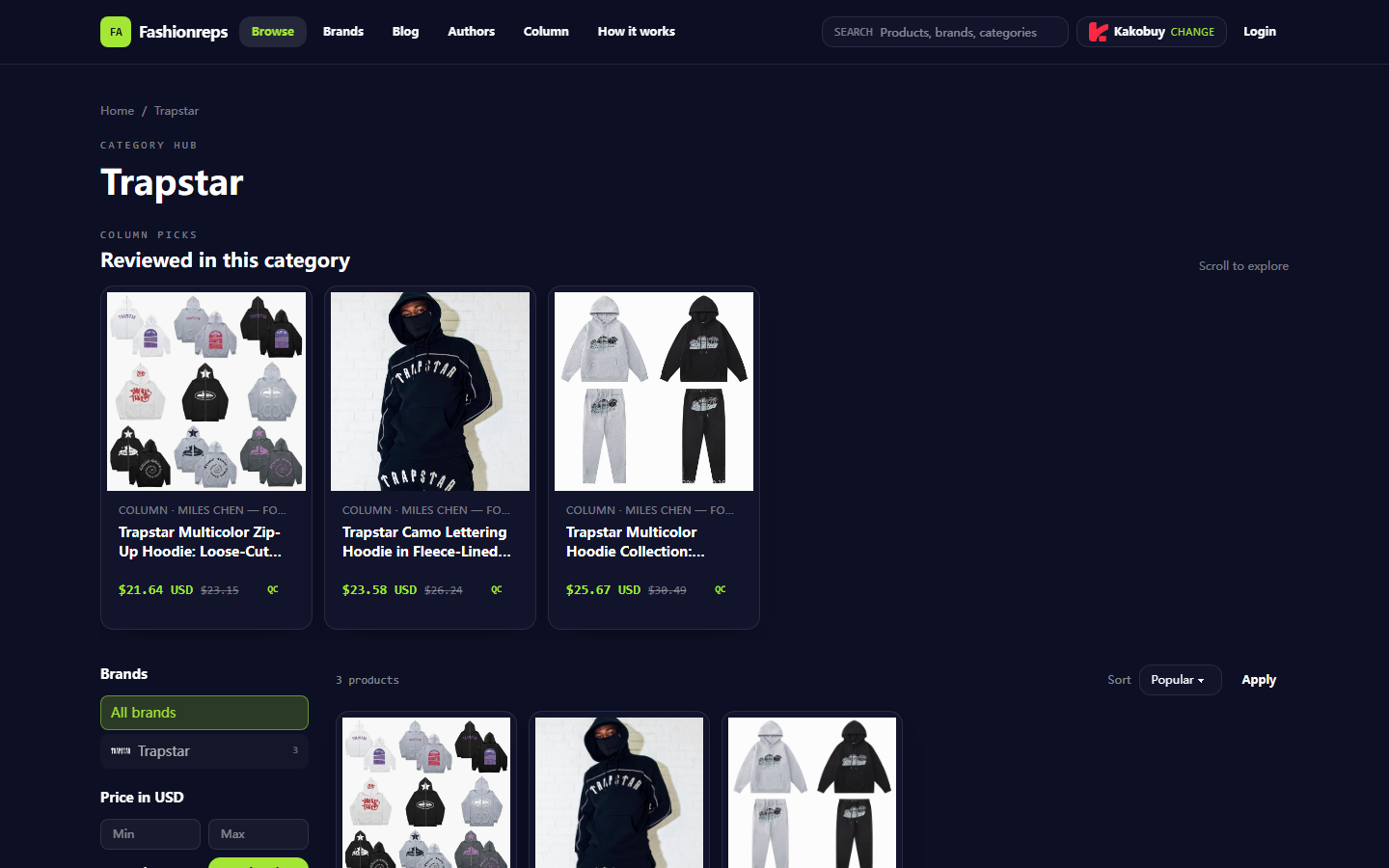
Image: Example of Fashionreps' Trapstar category page. Category pages can be used to discover products, but they cannot replace size and variant evidence on specific product pages.
Verification boundary: This article was recorded on October 15, 2026. Page prices, inventory, sizes, images, seller information, and link status may change, and any user preparing to order should reopen the page to verify before taking action. fashion-reps handles product discovery, information organization, and external shopping agent entry points; orders, payments, warehouse inspection, consolidation, shipping, and after-sales are usually handled by the website of the selected shopping agent. 🧭
First save the trapstar product page title, link, and current variant
Don't switch colors, sizes, or shopping agents yet. Save the product title, page URL, selected color, selected size, price field, image thumbnails, description text, and page time that are currently visible. The purpose is to avoid being unable to determine whether missing information was originally absent or temporarily not loaded after switching options after a page refresh.
It is recommended to keep the following records:
- Product page title, not just overly broad category names like Trapstar or Hoodie.
- Complete product page URL, and the entry point to the page, such as the Trapstar category page or on-site search results.
- Currently selected color, size, and other variant names; if there are no default options, clearly record that none are selected.
- Screenshots of the product's main image, variant images, and size chart shown on the page.
- Whether the page displays seller, product number, material, fit, price, and inventory status.
- The times when the page was first opened, refreshed, and reopened.
Currently visible category page information only proves that the page has several Trapstar product entries; it cannot prove that a certain fall/winter hoodie has complete S to XL sizes, all colors, or stable inventory. Material, size range, and colors in the category title should not be automatically applied to other products.
Check whether colors, sizes, images, and descriptions belong to the same product
When information is incomplete, the most common misjudgment is combining content from the same category into a seemingly complete product. You should check item by item whether the page clearly establishes the correspondence between product, color, and size.
| Check object | Acceptable evidence | Situations requiring pause |
|---|---|---|
| Product identity | Title, main image, description, and product number point to the same style | Title says Hoodie, but image shows a different zipper or different pattern, and there is no explanation |
| Color | Color option matches the selected variant image or description | Color name exists, but image doesn't change after switching, or image fails to load |
| Size | Variant options, size chart, and applicable product are consistent | Page says S–XL, but actual options only have some sizes, or size chart belongs to another style |
| Material & season | Description clearly states fabric, lining, or thickness | Only marketing words like "fall/winter" or "fleece" without verifiable material description |
| Inventory status | Current option has clear available, out-of-stock, or unavailable status | Button is gray with no reason, or status changes repeatedly after refresh |
The point is not that the more page fields the better, but whether these fields can point to the same variant. For example, if the image shows a black, purple, and white color-block zipper style, but the title says a regular pullover style, and the color option cannot be switched, you cannot use the size range of another product in the category page to fill in the evidence.
Check page loading, missing fields, and unselectable option status
First perform a low-risk page check, and do not continuously click buy, pay, or submit orders.
- Wait for the main images, options, and description to finish loading on the current page, then record the page state.
- Reload once and observe whether the product title, color, size, and buy button still exist.
- Without submitting an order, switch colors and sizes one by one, and record which options are selectable, which become gray or disappear.
- Check whether the main image, price, inventory text, and description change synchronously after switching options.
- Open the same page in another browser window or a cache-free environment to determine whether the missing fields only occur in the current session.
- If the page jumps from the product page back to the category page, login page, or blank page, save the addresses and times before and after the jump.
Do not directly interpret "button temporarily not clickable" as out of stock, nor directly interpret "image not changing" as image error. Incomplete page scripts, browser cache, login status, region settings, and missing variant data can all cause similar phenomena. ⚠️
Distinguish temporary display anomalies, missing information, and real variant conflicts
You can use three types of evidence to judge.
The first type is temporary display anomalies. The performance is usually that fields recover after refreshing or reopening, color and size options can be switched normally, and after switching, images, prices, or inventory status can update synchronously. In this case, you should still save the recovered page evidence before deciding whether to continue.
The second type is missing information. The performance is that the page can open stably, but there is no size chart, no variant images, no material description, or only a general size range. At this time, you cannot replace the current product evidence with size charts from adjacent products, search summaries, or other sites. Missing information should be marked as "unverified" rather than filled in with speculation.
The third type is real variant conflicts. The performance includes: after selecting a color, the title or image still points to another style; the page shows a certain size as selectable, but it becomes unavailable before submission; product numbers opened from different entry points are inconsistent; the size chart and the product description's fit completely conflict. In such cases, you should stop ordering and organize evidence first. 🛑
A practical judgment standard is: if you cannot answer "Does the specific color and size I am selecting now indeed belong to this product?", you have not met the conditions for ordering.
Use other visible page information for cross-checking
The role of cross-checking is to discover contradictions, not to fill in blanks for the product page. You can check the following information:
- Whether fashion-reps' Trapstar category page lists the current product as an independent entry, or just a summary card of the same series.
- Whether the style, color, and fit in the product title are consistent with the main image on the product page.
- Whether the product page provides an independent size chart, rather than using a general size description for the entire clothing category.
- Whether the price, inventory, and variant status on the page remain consistent after refresh.
- After entering the shopping agent, whether the agent page retains the original product's color, size, and product identification information.
- If the agent page lacks a certain variant, whether it is clearly marked as unavailable, not defaulting to another option.
Do not treat the external shopping agent's automatic translation, recommended size, or similar product tips as fashion-reps' original evidence. Also, do not treat other buyers' pictures, reviews, or social media screenshots as official variant proof of the current product page, unless the page clearly states that they correspond to the same product and the same set of variants.
If the page allows copying product information, you can save the title, variant names, and size chart separately to avoid capturing only one image that cannot show the context. When order numbers, addresses, phone numbers, payment information, or complete shipping labels are involved, do not upload publicly; if submitting screenshots is necessary, first cover personal information.
When to pause ordering and submit evidence to official support
If any of the following situations occur, you should pause purchasing:
- The target size does not have a clear selectable status, or the size chart is missing.
- Color name, product image, and product description cannot correspond.
- After refreshing or reopening, the product title, price, inventory, or variant status changes in an unexplainable way.
- The product identity, color, or size displayed on the product page and the shopping agent page are inconsistent.
- The page requires you to continue paying without seeing clear variant evidence.
- You cannot confirm whether the size chart on the page belongs to this Trapstar hoodie.
When submitting a support request, provide minimal but sufficient materials: product page URL, page title, verification date and time, currently selected color and size, steps that led to the problem, and page screenshots with personal information covered. The problem should be written as a verifiable description, for example, "After selecting black, the size chart still shows the dimensions of another style, and the main image does not change," not just "the page has a problem."
fashion-reps' public page states that its role is to help users discover products and direct the buy button to the selected shopping agent; orders, payments, and logistics are not completed by the category page itself. Therefore, if the problem occurs in the agent's payment, warehouse, inspection, consolidation, or logistics process, you should simultaneously submit materials to the official support of the agent actually handling that process. Do not submit payments repeatedly, and do not create multiple orders just to test buttons. 📦
Before support confirms, do not replace the original option with other colors or sizes, do not rely on low-price or limited-time prompts to rush ordering, and do not write uncertain size information into remarks and expect the warehouse to automatically correct it.
Review record table and next steps
After completing the check, you can use the following record to wrap up:
| Item | Record content |
|---|---|
| Page status | Loads normally, partially loads, changes repeatedly, or cannot open |
| Product identity | Whether title, product number, and main image are consistent |
| Variant evidence | Whether colors, sizes, images, and descriptions correspond one-to-one |
| Unresolved issues | Missing size chart, unselectable options, page conflicts, or inconsistent agent info |
| Next step | Continue checking, wait for page recovery, contact official support, or stop purchasing |
Only when the product identity is clear, the target color and size are selectable, the size chart belongs to the current product, there are no obvious conflicts between images and descriptions, and the agent page can retain the same variant information, is it appropriate to proceed to the next step. Before entering payment, you should also reconfirm price, inventory, shipping, destination country taxes, return and exchange conditions, and agent policies, as these are transaction facts that may change.
This troubleshooting method saves not a fixed amount of money, but reduces returns, exchanges, reshipments, and duplicate shipping costs caused by choosing the wrong size, color, or variant. It also adds a small amount of time cost, especially for taking screenshots, refreshing, and waiting for support replies. It is suitable for users who value size matching, are preparing to buy thick fall/winter styles, or have found contradictory fields on the product page; it is not suitable for users who already have complete and consistent product evidence and just want to complete payment quickly. As long as key variant evidence is still missing, stopping the order is the safer action.