Introduction When a Bape hoodie coupon fails on fashion-reps, it doesn't necessarily mean the item is out of stock or that you simply mistyped the code. More often, the cause is an expired promotion, regional restrictions, an order subtotal below the threshold, the item being in an excluded category, or the discount being reapplied only at checkout. This article aims to help you perform a documented verification before retrying, to determine whether the proble
Introduction
When a Bape hoodie coupon fails on fashion-reps, it doesn't necessarily mean the item is out of stock or that you simply mistyped the code. More often, the cause is an expired promotion, regional restrictions, an order subtotal below the threshold, the item being in an excluded category, or the discount being reapplied only at checkout.
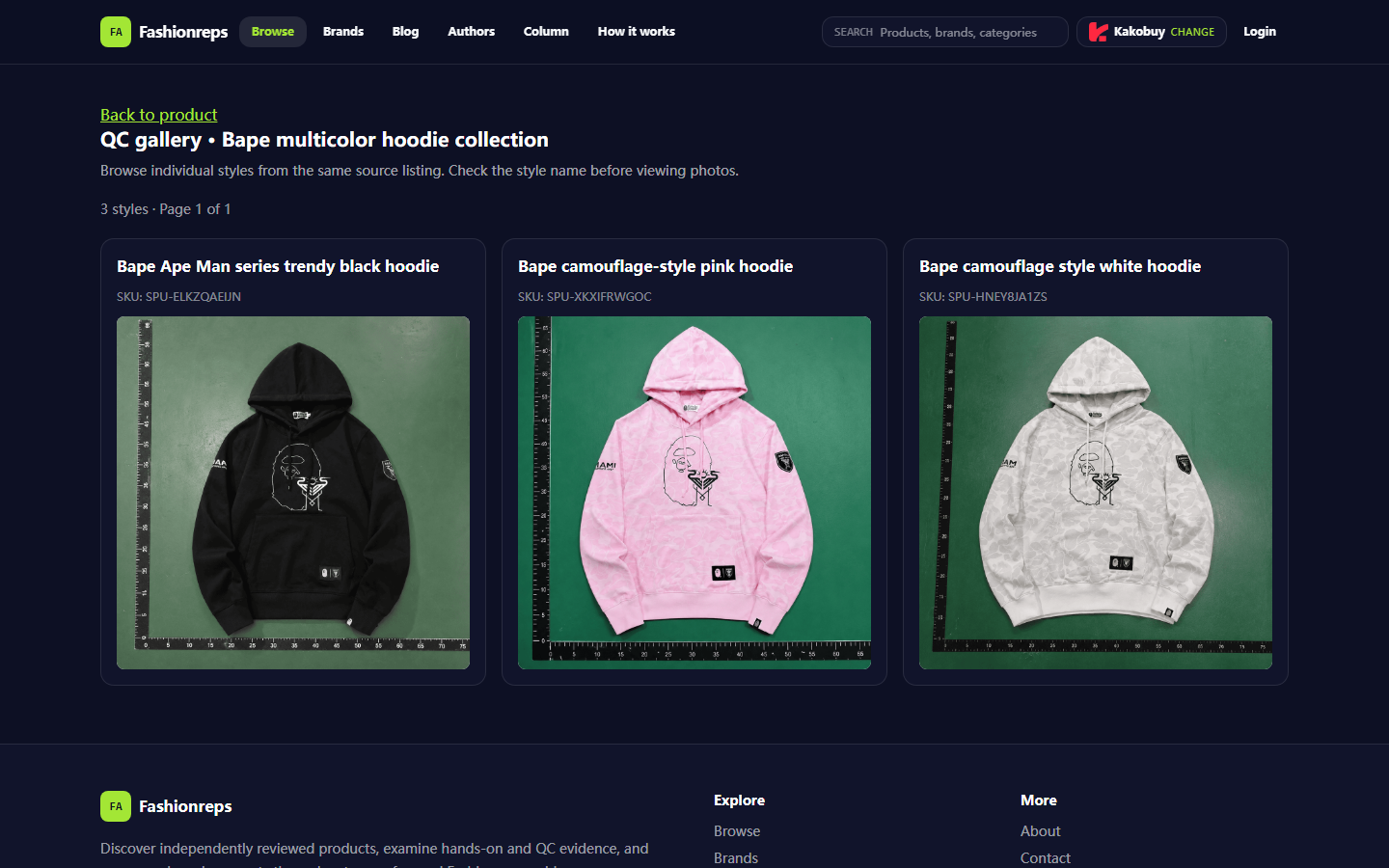
This article aims to help you perform a documented verification before retrying, to determine whether the problem lies with the coupon itself, the product terms, or the checkout notification. It does not provide unverified coupon codes, discount percentages, or savings guarantees. The currently available Fashionreps page evidence shows that the Bape multicolor hoodie collection page includes 3 styles and provides product status and QC image links; the page itself contains no real-time verifiable coupon information. 📌
Defining the specific signs of a Bape hoodie coupon failure
First, record the exact message you see, not just "doesn't work." Common signs include:
- After entering the code, you get an invalid, expired, or not eligible message.
- The code is accepted, but the discount amount still shows 0.
- The product page shows it's available, but the discount disappears after adding to cart.
- The checkout page says the item, region, payment method, or order amount doesn't meet the promotion requirements.
- The discount appears, then gets removed when you change quantity, shipping address, or delivery method.
Each sign points to a different troubleshooting direction. An "invalid" message is more likely a code status issue; if the discount disappears at checkout, check order terms and shipping info first.
Reopen the fashion-reps product page to verify the item status
Reopen the corresponding Bape hoodie page on fashion-reps and make sure you're looking at the correct style, not another color or variant from the same source. The provided QC page shows this collection includes the following 3 styles:
- Bape Ape Man series trendy black hoodie
- Bape camouflage-style pink hoodie
- Bape camouflage style white hoodie
The page also displays the corresponding SKUs. Before ordering, verify the style name, SKU, size, and product page status to avoid applying a coupon meant for one variant to another. QC images can help you confirm the page correspondence, but they alone cannot prove a coupon is valid, nor replace the final judgment at checkout. 🔎
If the product page redirects, shows empty content, lacks a clear product name, or only shows a tag collection page, do not use that page as evidence of coupon terms. Save the displayed product name, SKU, selectable options, and verification time.
Check coupon validity period and applicable regions
Currently, there is no verifiable official real-time information supporting any specific Bape hoodie coupon code, validity period, discount amount, or applicable countries. Therefore, you cannot assume a coupon is still valid based on search results, old screenshots, or other users' past shares.
When checking, look for information explicitly stated by the coupon issuer or the actual checkout platform:
- Start and end times, noting the time zone.
- Applicable countries or regions, and whether shipping address is restricted.
- Accepted currency and whether a specific payment method is required.
- Whether it's limited to new users, specific accounts, or designated campaign pages.
- Whether it can only be used once per account, order, or item.
If the page only says "limited-time offer" or "exclusive discount" without specific dates and conditions, treat it only as a hint to be verified, not as a confirmed valid coupon. ⏱️
Check order amount, category restrictions, and exclusions
Even if the code is still within its validity period, it may fail because the order doesn't meet the terms. Break down the pre-checkout order into checkable items:
- Does the item subtotal meet the minimum amount?
- Is the threshold calculated on item amount, or after other discounts?
- Is the Bape hoodie in the eligible category?
- Are specific brands, collabs, clearance items, or already discounted items excluded?
- Does it require purchasing a specific quantity or combination?
- Do shipping, service fees, taxes, and insurance count toward the threshold?
- Does the discount only apply to the item price and not to warehousing, inspection, shipping, or other service fees?
Don't add items you don't need just to meet the threshold. If you increase your merchandise spend, shipping, or later warehousing costs to get a small discount, the final order total could actually be higher.
Distinguish between code issues, item terms, and checkout page messages
You can do a low-risk review in this order:
- Copy the current item name, SKU, quantity, and order subtotal.
- Reopen the checkout page without submitting payment.
- Delete the code and re-enter it, checking for extra spaces or case differences.
- Check if the shipping region, currency, payment method, or delivery option has changed.
- Record the full system message and whether the discount amount changes.
- Change only one variable at a time, e.g., only quantity, not address and shipping method simultaneously.
If the same code works on other eligible items but not on the Bape hoodie, the issue is more likely related to item exclusions or category restrictions. If it fails on all items, suspect code expiry, account restrictions, or campaign scope changes. If the discount disappears only after selecting a certain shipping method, check the shipping region, route, and fee conditions.
The final amount on the checkout page is closer to the actual order result than the product page, but before paying, still confirm order details, service fees, destination country taxes, and import restrictions. A coupon cannot change the destination country's declaration and compliance requirements. 🧾
How to document when there is no official real-time coupon information
When there is no official real-time coupon information, the safest approach is to save verification records rather than guess about the code. It's recommended to record:
- Product page title, SKU, page status, and verification date.
- Where the coupon message appears: product page, cart, or checkout.
- The name of the code's source page or account campaign page.
- Original text summary of validity, applicable region, threshold, and exclusions.
- Order subtotal, discount amount, and total payable before and after entering the code.
- Error message and shipping conditions shown on the checkout page.
Screenshots should cover names, addresses, phone numbers, order numbers, payment info, and other account privacy. Do not publicly share complete shipping labels or account credentials. If you don't have legitimate evidence directly relevant to the current issue, don't use third-party screenshots to prove real-time coupons.
The representative image specified in this article comes from the fashion-reps Bape multicolor hoodie collection QC page, used to help identify the product series and page context. It does not indicate the coupon is valid, nor does it indicate a completed purchase or received verification.

Caption: QC page and style links for Bape multicolor hoodie collection on Fashionreps.
Coupon troubleshooting checklist before retrying
Go through each item before submitting the order:
- The current page still shows a clear Bape hoodie name and corresponding SKU.
- The selected color, size, and quantity match the coupon terms.
- The code's source is traceable, and the validity period and time zone are confirmed.
- Destination and account region meet the campaign scope.
- Item amount meets the threshold, and the threshold calculation is clear.
- The item is not in brand, category, collab, or discount exclusions.
- Other discounts won't override, replace, or cancel this code.
- The checkout page still shows the discount amount, not just promotional text on the product page.
- Shipping, service fees, taxes, and possible import fees are reviewed separately.
- Screenshots and records have personal information covered.
If any item cannot be confirmed, mark the coupon status as "unverified" and do not include the estimated savings in your budget.
Decision to order after confirming terms
Only when the code source, validity, region, order threshold, item exclusions, and checkout amount all match should you count the discount in your budget. If the page has no official real-time coupon information, the reasonable decision is to evaluate the order at the undiscounted price until the checkout page clearly shows an applicable discount.
Savings should be calculated based on the actual amount payable before and after checkout, not on promotional discounts or possible maximum discounts. Risks after applying a coupon still include: item status may change, the discount may be revoked due to order modifications, shipping and taxes may not be covered by the discount, and import restrictions and taxes of the destination country still apply.
This verification method is suitable for buyers who want to confirm terms before payment, need to control their budget, and are willing to keep order evidence. It is not recommended to stock up, add unrelated items, bypass regional restrictions, or use codes from unverifiable sources just to chase an uncertain discount. If the checkout page still shows an error, keep the original order draft and message, and first confirm with the customer service of the platform actually processing the order before deciding whether to retry. ✅
Article image